
SwearGuard
Calm parental control for Windows gaming PCs: screen time, safe internet, YouTube limits and swear alerts, with a phone app for parents.
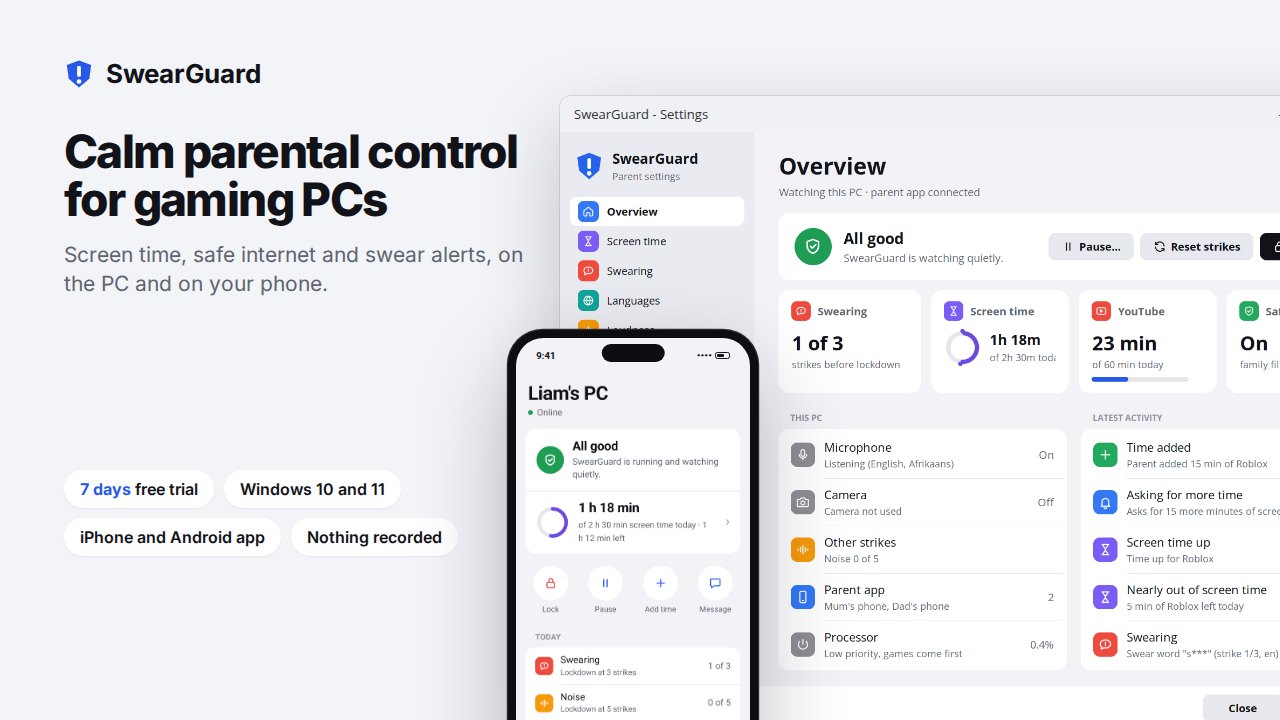
See SwearGuard at work
A product tour and a short ad.
Your kid's PC, live on your phone
iPhone or Android. It installs from the browser, with no app store, and connects by scanning a code on the PC.
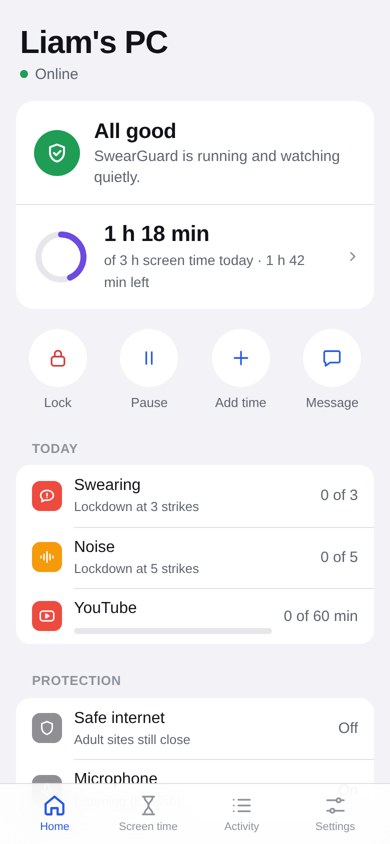
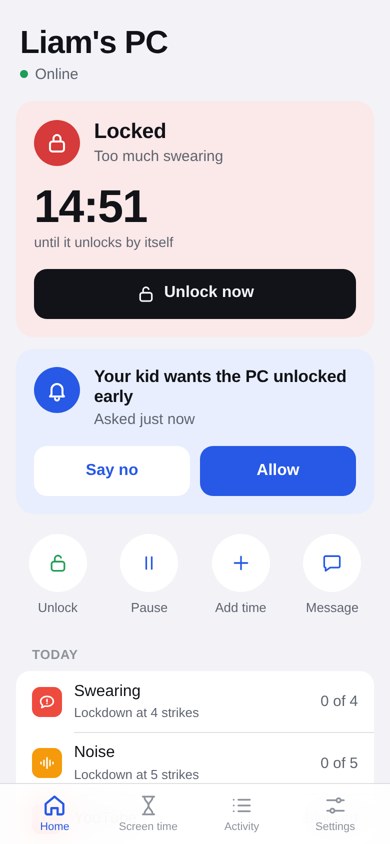
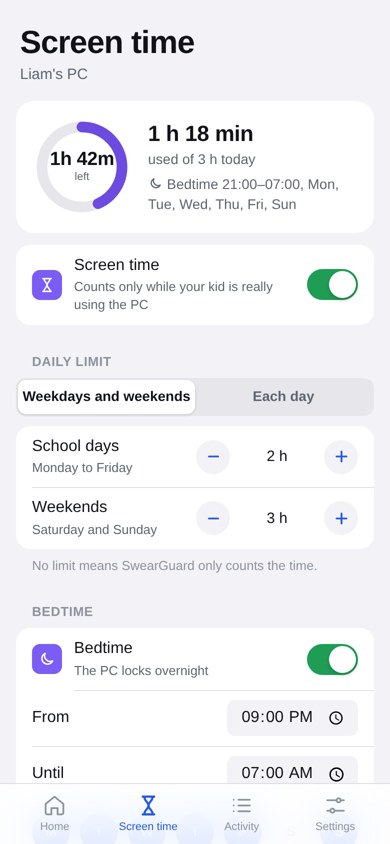
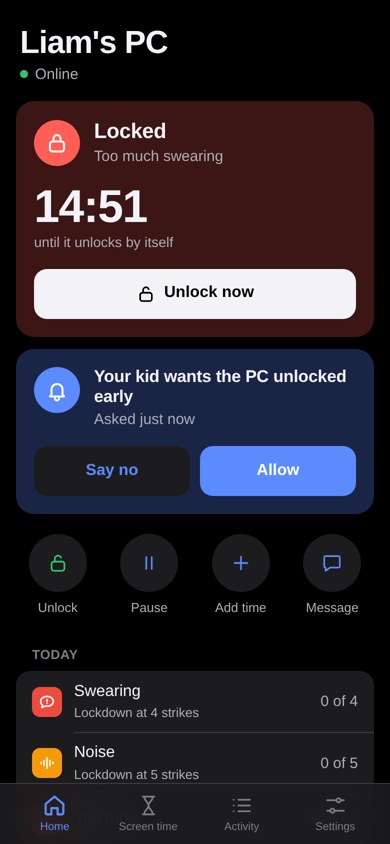
- Home
- Status (all good, locked with a countdown, or paused), today's screen time ring, strikes, YouTube minutes, and one-tap Lock, Pause, Add time and Message.
- Alerts with buttons
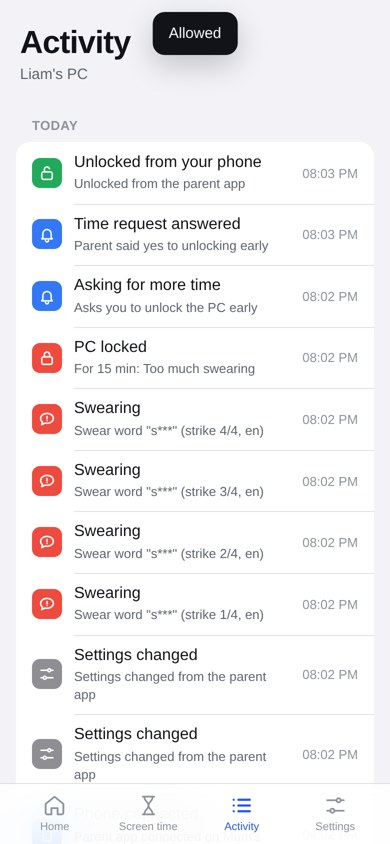
- Your phone buzzes when the PC locks, the camera or mic goes off, safe internet is changed, an adult site is tried, SwearGuard is closed, or your kid asks for time.
- More time, one tap
- Answer yes or no, or add 15 minutes, 30 minutes or an hour. Changes made while the PC is off apply when it's back.
- Messages
- Send a message to the PC screen, like "Dinner's ready".
- Whole family
- Several PCs on one phone, up to 6 phones per PC.
- End-to-end encrypted
- PC to phone uses AES-256-GCM. The key is only in the pairing code, so the server can't read what it passes along.
Made for the PC your kid games on
It watches for what parents actually worry about: swearing and shouting at the screen, hours of YouTube Shorts, gaming past bedtime, and websites they shouldn't see.
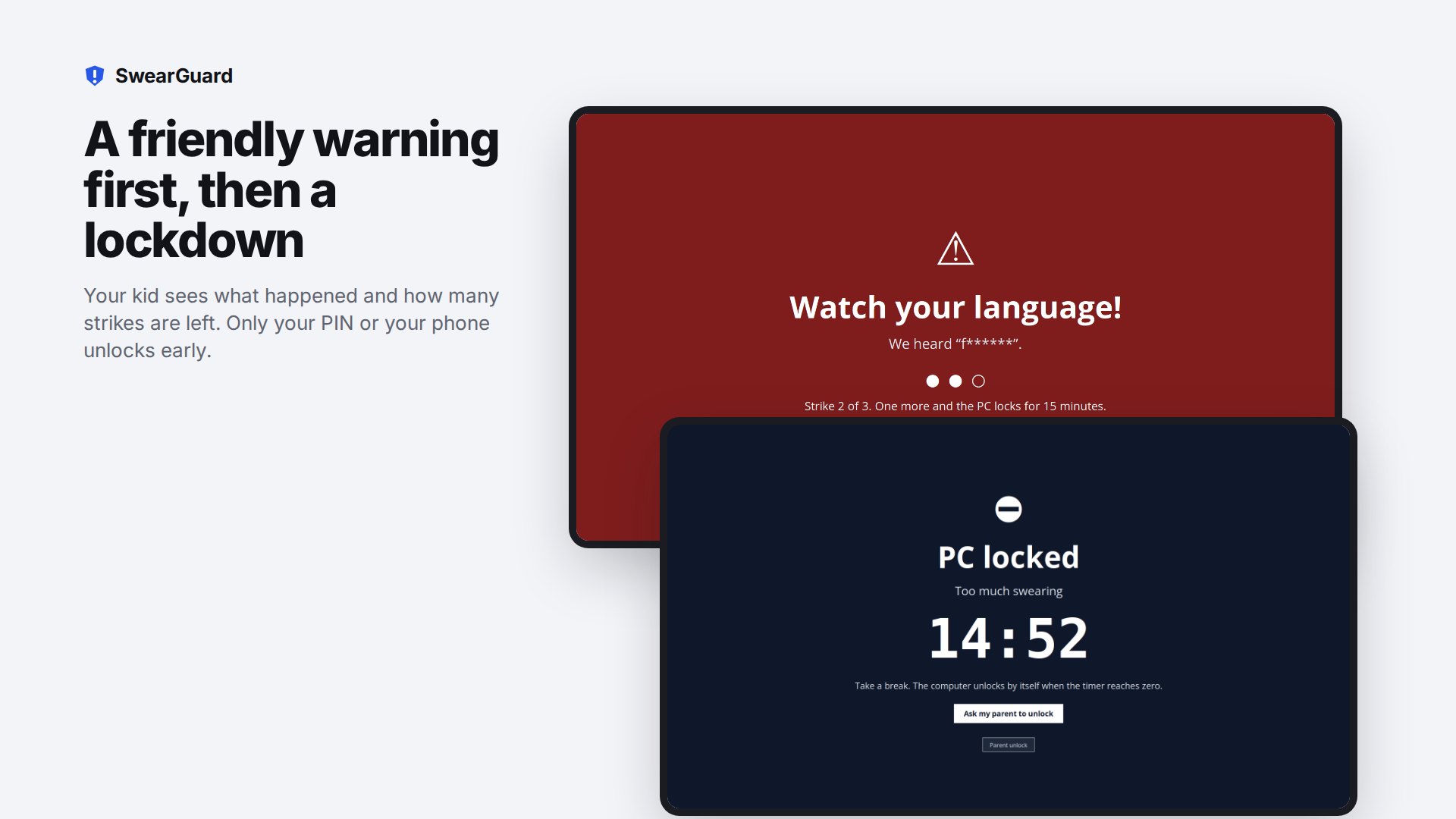
Friendly, then firm
When a rule is broken, your kid first gets a friendly full-screen warning and a strike. After too many strikes the PC locks for as long as you choose.
- Set it up on the PC behind your parent PIN, or from your phone
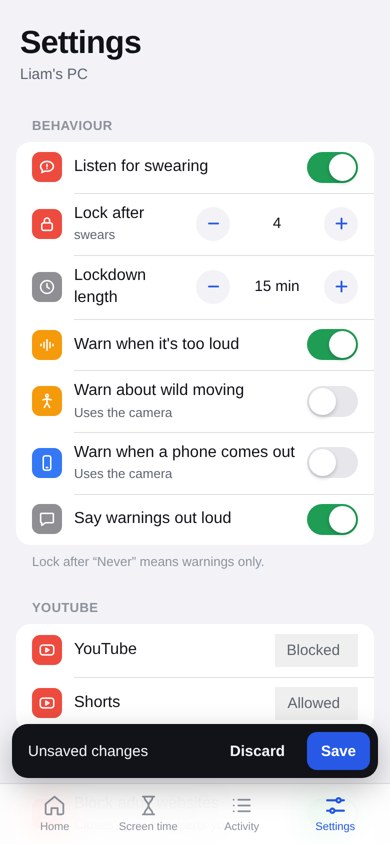
- Every feature has its own on/off switch
- Every lock rule can be turned off, so that feature only warns
- Speech and the camera picture never leave the PC
Hears it in 8 languages
Offline, on the PC. An accent-friendly English engine understands British, South African, Indian, Caribbean and other accents much better than a standard one.
- Built-in word lists
- With an option for mild words. Add your own words, and end one with * to catch every word starting with it.
- Words that never count
- Add exceptions, and use the "Try a sentence" box to see exactly what would count.
- Masked warning
- The warning hides the word and shows a strike meter, so your kid knows how close the lock is.
A plan for every day of the week
Time only counts while your kid is really using the PC, meaning keyboard or mouse in the last 2 minutes.
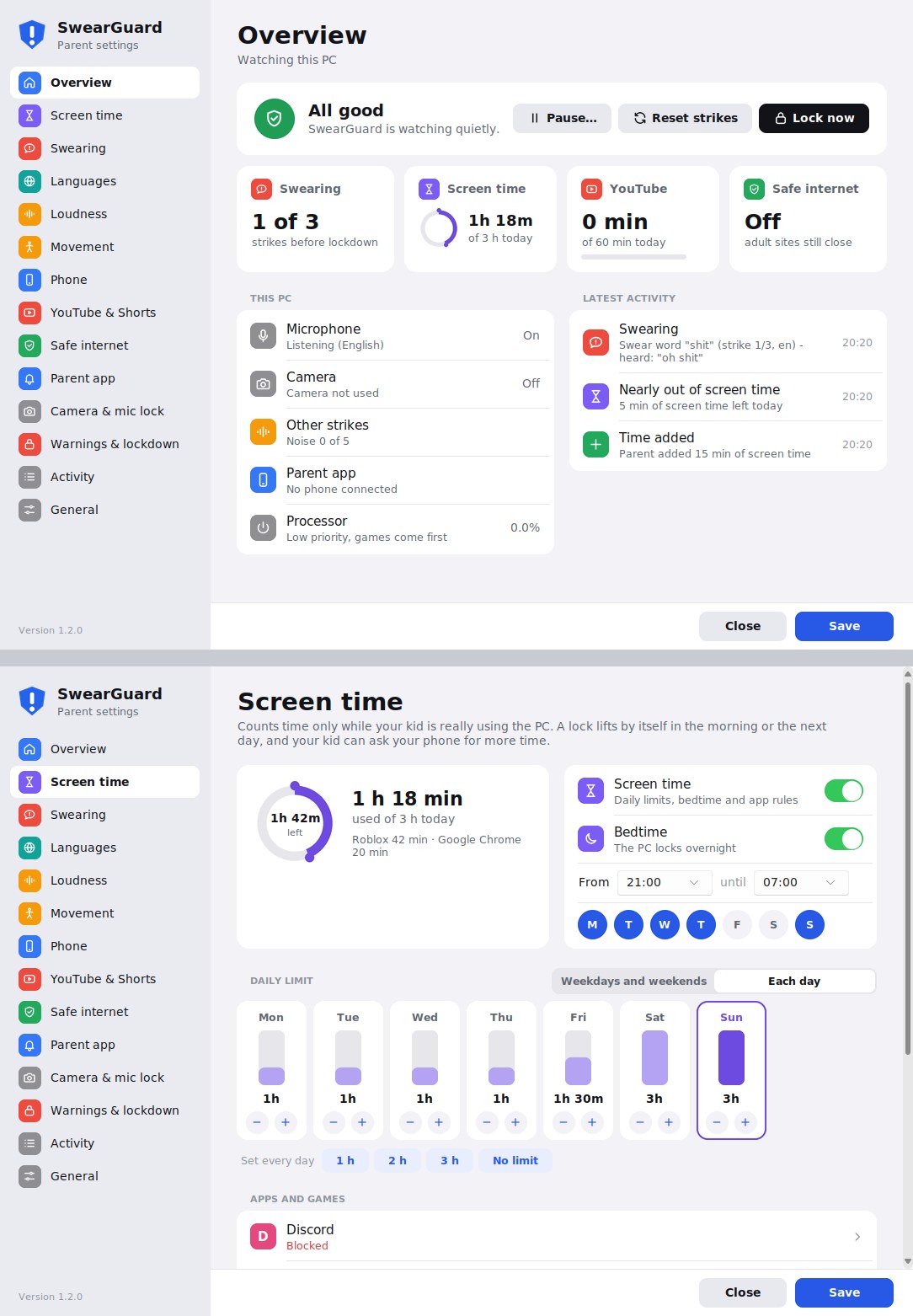
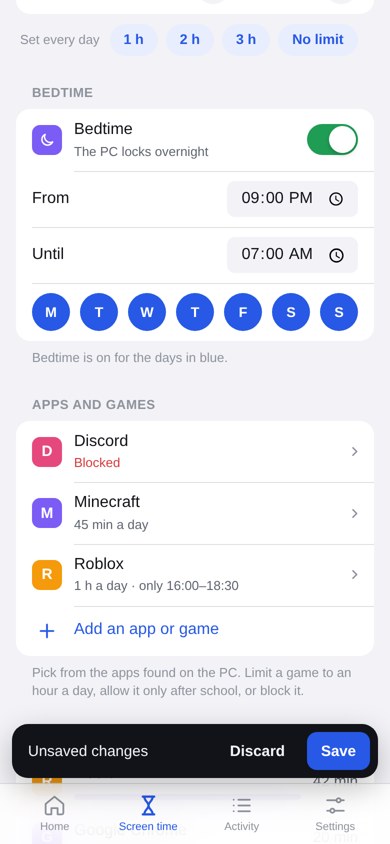
- A daily limit for school days and weekends, or a different one for each day in a week planner
- Bedtime: the PC locks between the times you choose, on the nights you pick
- A heads-up 5 minutes before a limit runs out
- A lock lifts by itself when bedtime ends or the next day starts
- Picked from the apps SwearGuard finds on the PC
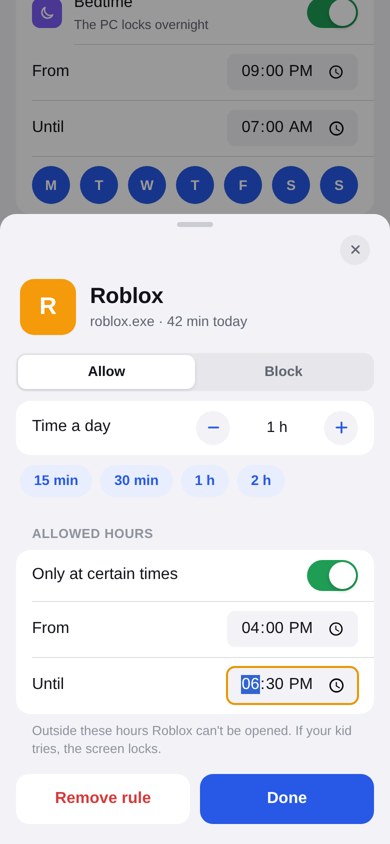
- Minutes a day, like Roblox for 1 hour
- Allowed hours only, like Minecraft from 16:00 to 18:30
- Or blocked completely
- Your kid can tap "Ask my parent for more time"
No more endless Shorts
- A daily YouTube limit. When it's used up, YouTube tabs close until tomorrow
- Shorts can be allowed, limited or blocked
- A Short that isn't allowed can be turned into the normal video, closed, or closed with a strike
- Works in Chrome, Edge, Brave, Firefox, Opera and Vivaldi, with no browser extension
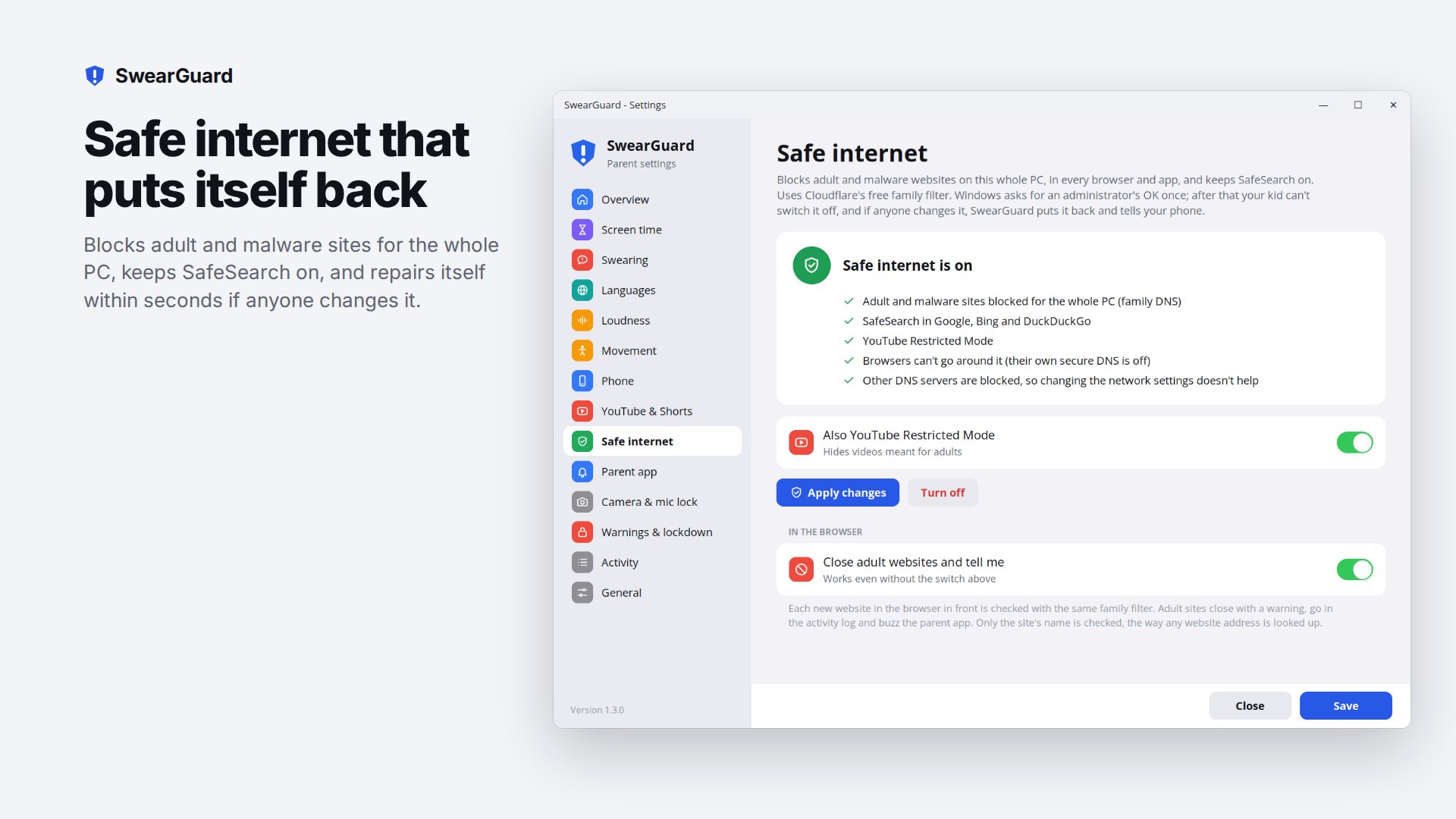
One button for the whole PC
- Blocks adult and malware sites in every browser and app, using Cloudflare's family filter
- SafeSearch forced on in Google, Bing and DuckDuckGo; YouTube Restricted Mode optional
- Browsers can't get around it with their own secure DNS
- If anything is changed, SwearGuard puts it back within seconds and tells your phone
- Adult sites are closed with a "Not allowed!" screen and reported, even with safe internet off
Safe internet for every device at home
A separate, optional service for phones, tablets, consoles, TVs and routers, with or without the SwearGuard app. It has its own sheet.
The extra guards, all optional
Turn on only what you need. The webcam is used only for the camera features.
- Too loud for too long
- Measured from the mic level only, with a live meter to help you set the limit.
- Wild moving around
- Measured from how much of the camera picture changes.
- Phone held up
- A phone in view while gaming, after the time you choose.
- Camera and mic lock
- The PC locks while the camera is covered or unplugged, when nobody is at the PC for 20 seconds, or while the mic is muted.
- Spoken warnings
- An optional spoken line in a friendly recorded voice (English) or the Windows voice.
- Lockdown your way
- Choose lockdown length (15 min by default), strikes before a lock, warning time, when strikes are forgotten, and a warm-up after unlock.
The lockdown counts down and unlocks by itself. Only your PIN or your phone unlocks it early. It can also lock Windows itself, like Win+L.
Stays on
- Starts automatically for every Windows account on the PC
- Closed in Task Manager? A watchdog restarts it within a minute and tells your phone
- Safe internet and the watchdog can only be removed by a Windows administrator
Nothing is recorded
- Speech, sound and the camera picture are checked on the PC and thrown away
- Only sentences with a bad word are kept, in the PC's own activity log
- The parent PIN is stored as a salted hash
- Only the license check and website names (for the family filter) leave the PC
Measured on a small 4-core test PC.
The same guard, on the phone
An Android version is in testing. It runs on the kid's own phone and uses the same ideas as the PC app: listen, warn, then lock.
- Swearing
- Hears swear words through the phone's mic with a speech model that is built into the app and runs offline.
- Loudness and camera
- Watches how loud it gets and uses the camera to see when someone is there.
- Warn, then lock
- A warning screen first, then a lock screen after the strikes you choose.
- Parent PIN
- Settings and unlock sit behind a PIN.
- Stays on
- Starts by itself when the phone starts, and can be set as a device admin so it is harder to remove.
Version 0.1, a test build. Not on the Play Store yet.
7 days free, then $1.99 a month
$1.99 a month for 1 PC, or $5.99 a month for up to 4 devices. A device is a kid’s Windows PC now, and a kid’s Android phone once that app is out. Parent phones are free. Cancel any time through Gumroad.
- Windows 10 or 11, 64-bit
- A microphone (a headset works best)
- A webcam, only for the camera features
- Internet for the phone app, safe internet and the license check; everything else works offline. The license is checked once a day, and SwearGuard stops guarding after 3 days with no check
- Speech models download once: about 40 MB per language (Afrikaans 480 MB)
- For the phone app: an iPhone (add it to the Home Screen for alerts) or an Android phone
- Built for kids on a standard Windows account. An administrator account can undo safe internet and the watchdog
- Browser checks see the tab in front, and only the website's name
- Speech recognition is strongest in English, German, Spanish and Italian. Some swears are missed in other languages, and the odd clean word can be heard as a swear
- The installer is not signed yet, so Windows may say the publisher is unknown when you install it